Dashboard
search
Upload Artwork
Uploading your artwork is the first step toward showcasing your creativity to collectors, art enthusiasts, and potential buyers on LabriniHouse.
The quality of the information you provide is just as important as the artwork itself. A complete and carefully prepared submission helps present your work professionally and allows our AI-powered tools to better understand, analyze, and promote your artwork.
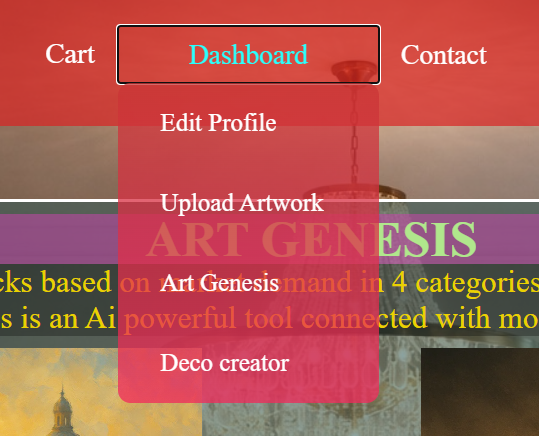
You can access the upload page by navigating to:
Header → Dashboard → Upload Artwork
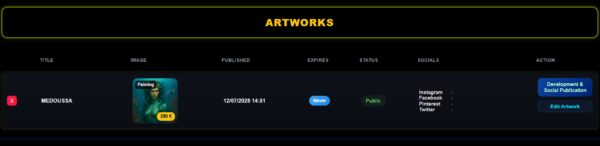
Your Uploaded Artworks
Before the upload form, you’ll find the Uploaded Artworks section.
This area displays all the artworks you have previously published on LabriniHouse.
From there, you can quickly review your portfolio, manage your existing artworks, and keep track of everything you have uploaded.
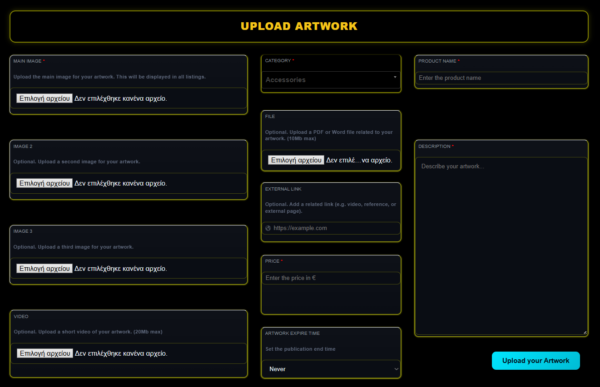
Step 1 – Upload Your Images
Main Image (Required)
The Main Image is the primary image that represents your artwork throughout the platform.
It will be displayed in artwork listings, previews, search results, and other areas of LabriniHouse.
Choose a high-quality image with good lighting and accurate colors to showcase your work at its best.
Image 2
Optional.
Upload a second image showing another angle, detail, or close-up of your artwork.
Image 3
Optional.
Upload a third image to provide additional views or highlight important details.
Providing multiple images gives visitors a better understanding of your artwork.
Step 2 – Select the Category (Required)
Choose the category that best matches your artwork.
Selecting the correct category helps organize your artwork properly and improves search accuracy across the platform.
Step 3 – Product Name (Required)
The Product Name is one of the most important fields in the entire upload process.
Choose a descriptive, meaningful, and professional title that reflects the character of your artwork.
Avoid generic names whenever possible.
A carefully written title helps both visitors and our AI systems better understand your artwork.
The Product Name is used by several AI tools throughout LabriniHouse during artwork analysis, promotion, optimization, and marketing.
The more accurate and descriptive your title is, the better the AI can generate relevant suggestions and promotional content.
Step 4 – Upload a File (Optional)
You may upload a supporting PDF or Word document related to your artwork (up to 10 MB).
This can include:
Certificates of authenticity.
Technical specifications.
Design documentation.
Additional information for collectors.
Presentation material.
Step 5 – External Link (Optional)
If your artwork is featured elsewhere, you can provide an external URL.
Examples include:
A video presentation.
A personal website.
An exhibition page.
A portfolio.
Any relevant online reference.
Step 6 – Set the Price (Required)
Enter the selling price of your artwork in Euros (€).
Choose a price that reflects the value, uniqueness, craftsmanship, and artistic quality of your work.
Step 7 – Artwork Expire Time
Choose how long your artwork will remain published on the platform.
Available options are:
3 Months
6 Months
1 Year
Never
Selecting Never means your artwork will remain published until you decide to remove it yourself.
Step 8 – Artwork Description (Required)
The Description is one of the most important parts of your artwork submission.
Take your time to write a detailed, informative, and engaging description.
You may include information such as:
The inspiration behind the artwork.
The artistic concept.
Materials used.
Techniques.
Style.
Dimensions.
Symbolism.
Creative process.
Any interesting story behind the piece.
Why is the description so important?
LabriniHouse uses Artificial Intelligence throughout many of its creative and marketing tools.
Your artwork description is analyzed by our AI systems to better understand the meaning, style, and characteristics of your creation.
A rich and well-written description allows the AI to produce:
More accurate artwork analysis.
Better marketing suggestions.
Higher-quality social media content.
More relevant promotional texts.
Improved SEO recommendations.
Smarter buyer targeting.
Better overall AI-generated results.
The more complete and descriptive your information is, the more effectively the AI can work on your behalf.
Step 9 – Publish Your Artwork
After reviewing all your information, click the Upload your Artwork button.
Your artwork will be securely uploaded and added to your personal collection on LabriniHouse.
Once published, it becomes available for use throughout the platform’s AI ecosystem, allowing you to take advantage of promotion tools, optimization features, and future marketplace services.
Tips for the Best Results
✔ Always upload high-resolution images.
✔ Choose a clear and meaningful artwork title.
✔ Write a detailed and engaging description.
✔ Select the correct category.
✔ Set an appropriate selling price.
✔ Add additional images whenever possible.
✔ Include supporting documents or external links if they provide valuable information.
✔ Review your submission carefully before clicking Upload your Artwork.
A complete and professional artwork submission not only creates a better experience for collectors but also enables LabriniHouse’s AI tools to deliver more accurate insights, stronger promotional strategies, and better opportunities to showcase your work to the right audience.