
Dashboard
search
Deco Creator
Design Professional 3D Decorative Objects with Artificial Intelligence
Deco Creator is one of the most advanced AI-powered design tools available on the LabriniHouse platform.
Built specifically for artists, designers, architects, interior decorators, and creative professionals, Deco Creator allows you to generate original three-dimensional decorative objects through an intuitive step-by-step workflow without requiring any previous 3D modeling experience.
Like Art Genesis, Deco Creator combines Artificial Intelligence with real market intelligence to help you create decorative products that are not only visually impressive but also aligned with current market demand.
Through advanced API technology, Deco Creator is connected to some of the world’s leading market intelligence sources. These connections continuously analyze global design trends, interior decoration styles, collector interests, consumer preferences, and commercial demand.
Rather than generating completely random objects, Deco Creator uses this market intelligence together with your selected creative parameters to produce unique 3D concepts that have stronger commercial potential while preserving your own artistic vision.
Whether you are creating decorative objects for homes, hotels, galleries, luxury interiors, commercial spaces, or collectors, Deco Creator provides an intelligent environment that transforms your ideas into professional 3D models ready for visualization, presentation, or future production.
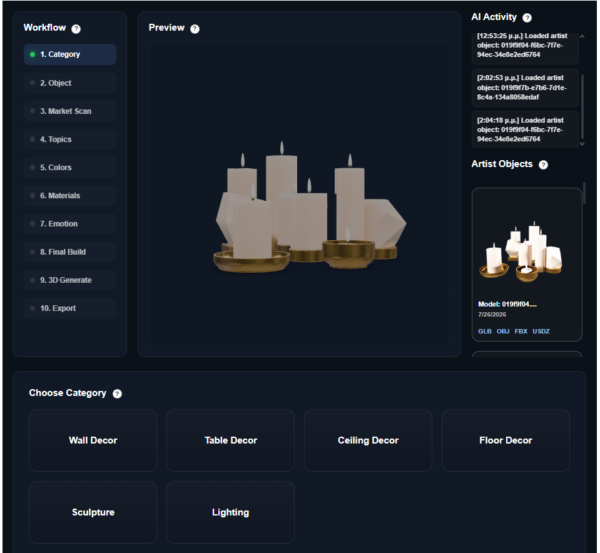
Supported Categories
Deco Creator currently supports six major decorative design categories.
Each category includes specialized subcategories that help the AI better understand the type of object you wish to create.
1. Wall Decor
Decorative objects designed specifically for walls.
Available subcategories:
Wall Masks
Wall Lamps
Metal Frames
Decorative Panels
2. Table Decor
Decorative objects intended for tables, shelves, desks, and furniture.
Available subcategories:
Ashtrays
Candles
Mini Sculptures
Vases
Crystal Objects
3. Ceiling Decor
Large decorative objects suspended from the ceiling.
Available subcategories:
Hanging Lights
Ceiling Sculptures
4. Floor Decor
Decorative objects designed to become focal points within interior spaces.
Available subcategories:
Standing Lamps
Decorative Totems
5. Sculpture
Generate original artistic sculpture concepts.
Available subcategories:
Abstract Figures
Animal Sculptures
6. Lighting
Create artistic lighting concepts that combine functionality with decorative design.
Available subcategories:
Ambient Lamps
Wall LEDs
Table Lamps


Credits Required
Deco Creator uses the LabriniHouse Credits System.
Each 3D model generation requires 30 Credits.
Before starting the generation process, your account must contain at least 30 available Credits.
If your balance is below 30 Credits, the generation tools will remain locked until additional Credits are purchased.
Purchasing Credits
To purchase Credits, simply click the Credits button located in the website header.
You can choose one of the available packages:
Package A
60 Credits
€10
Package B
150 Credits
€20
Package C
500 Credits
€50
After selecting your preferred package, proceed through the secure checkout process.
Once your payment has been successfully completed, your Credits are automatically added to your account and become immediately available for Deco Creator.
Step 1 – Select a Main Category
Begin by choosing one of the six available design categories:
Wall Decor
Table Decor
Ceiling Decor
Floor Decor
Sculpture
Lighting
This selection determines the overall design direction of your future 3D model.
Step 2 – Select a Subcategory
After selecting the main category, choose the subcategory that best represents the object you want to create.
Each subcategory provides additional information to the AI, allowing it to generate designs that better match your creative vision.
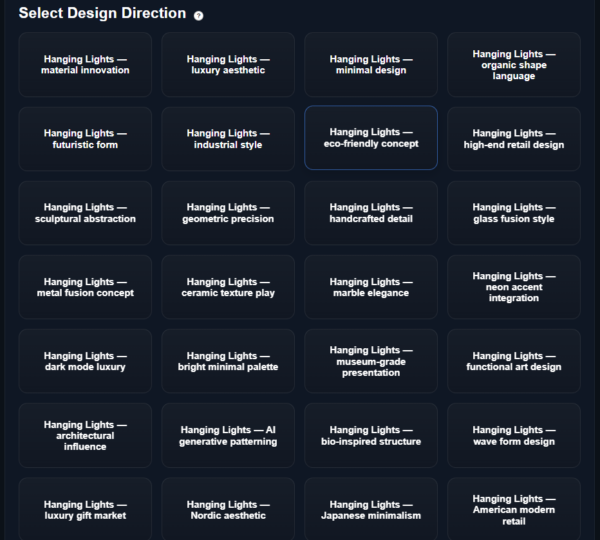
Step 3 – Select Three Topics
Next, Deco Creator presents a collection of creative topics.
Select three topics that best describe the style, inspiration, or artistic direction you want your object to follow.
The selected topics have a significant influence on the final design and help guide the AI throughout the generation process.
Different topic combinations can produce dramatically different decorative concepts.
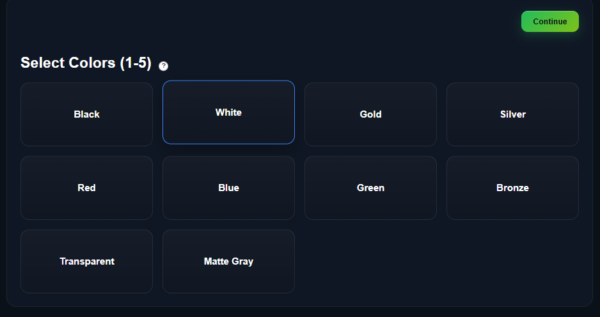
Step 4 – Select Your Colors
Choose between one and five colors for your design.
These colors help communicate your preferred visual direction to the AI.
Important Information
The selected colors should be considered creative guidance rather than strict design rules.
Because Deco Creator combines Artificial Intelligence with real market intelligence, the final generated model may include color variations that differ from your exact selections.
This is intentional.
The AI continuously evaluates market demand, current design trends, collector preferences, and commercial attractiveness when generating each model.
As a result, the final design may introduce colors that better match today’s market while remaining faithful to your overall artistic direction.
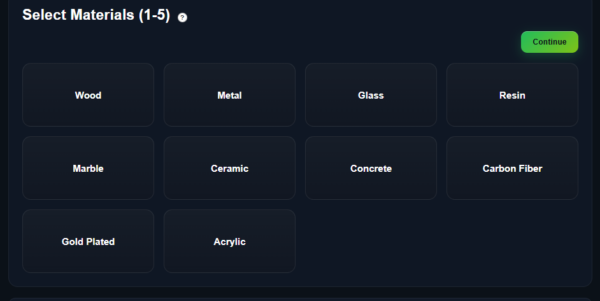
Step 5 – Select Your Materials
Next, choose between one and five materials for your decorative object.
Examples include materials such as:
Metal
Wood
Glass
Marble
Stone
Crystal
Ceramic
Concrete
Resin
Other decorative materials
Important Information
Material selections are also treated as creative guidance.
The AI may suggest or generate alternative material combinations if market analysis indicates that different materials are currently more desirable for your selected object type.
This intelligent flexibility allows Deco Creator to balance your artistic preferences with current commercial opportunities.
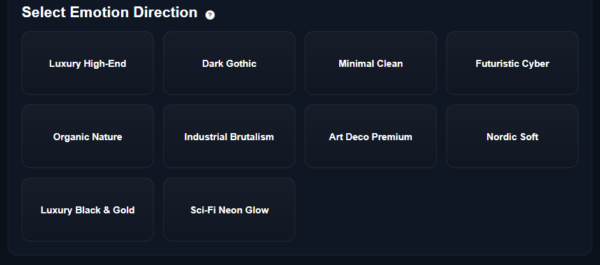
Step 6 – Select the Emotional Direction
Choose the emotional atmosphere you would like your design to communicate.
The Emotional Direction influences the personality of the final object by affecting characteristics such as:
Shape
Curves
Composition
Visual balance
Artistic expression
Overall aesthetic
This step helps the AI create decorative objects with a stronger emotional identity rather than simply producing functional designs.
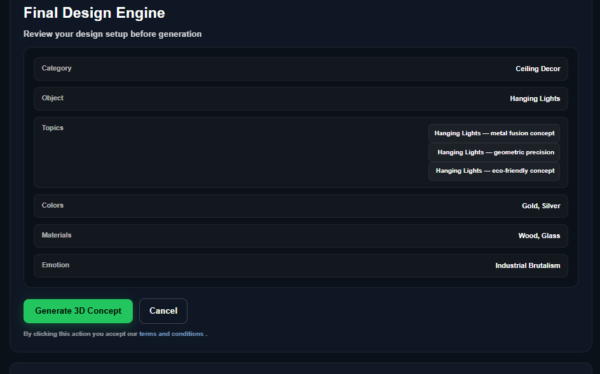
Step 7 – Review Your Design
Before generation begins, Deco Creator displays a confirmation page summarizing all of your selections.
You will be able to review:
Main Category
Subcategory
Selected Topics
Colors
Materials
Emotional Direction
Two buttons are available:
Cancel
Selecting Cancel returns you to the previous steps, allowing you to modify your selections before starting the generation process.
Generate
Selecting Generate confirms your choices and starts the AI generation process.
Step 8 – AI Model Generation
Once generation begins, Deco Creator starts creating your professional 3D model.
Unlike image generation, producing high-quality three-dimensional objects requires more computational processing.
The complete generation process typically takes between 6 and 10 minutes.
During this time, the AI combines your selected parameters with current market intelligence to generate a unique decorative object.
Step 9 – Artist Objects
When the generation process has been completed successfully, your model automatically appears inside the Artist Objects section.
This area contains every 3D object you have generated using Deco Creator.
Each generated model belongs exclusively to your account and remains available for future download.
Available Download Formats
Every generated object includes professional 3D export files.
Available formats include:
GLB
OBJ
FBX
USDZ
These industry-standard formats are compatible with a wide variety of 3D software, rendering engines, AR applications, visualization tools, and production workflows.
Ownership & Privacy
Every 3D model generated by Deco Creator is unique.
Each generated object:
Belongs exclusively to the user who created it.
Is securely stored inside the Artist Objects section.
Can be downloaded at any time.
Is not accessible by other users.
This guarantees complete ownership of every generated design within your personal LabriniHouse workspace.
Tips for Better Results
✔ Choose the category that best matches your intended decorative object.
✔ Carefully select your three topics, as they strongly influence the generated design.
✔ Combine colors thoughtfully to establish the desired visual atmosphere.
✔ Select materials that best reflect your creative vision, while remembering that the AI may intelligently adapt material choices according to current market demand.
✔ Experiment with different Emotional Directions to create objects with unique artistic personalities.
✔ Generate multiple concepts to explore different creative possibilities before deciding on your final design.
Deco Creator has been developed to combine artistic imagination, Artificial Intelligence, and real-world market intelligence into a single creative workflow, helping artists and designers produce professional 3D decorative objects with greater creative confidence and stronger commercial potential.