Dashboard
search
Art Genesis
Create Market-Oriented Artworks with Artificial Intelligence
Art Genesis is one of the most advanced AI-powered creative tools available on the LabriniHouse platform.
Designed specifically for artists, designers, and creative professionals, Art Genesis allows you to generate original artworks in less than a minute through an intuitive guided workflow.
Unlike traditional AI image generators that simply create images from text prompts, Art Genesis combines Artificial Intelligence with market intelligence to help artists create artworks that are not only visually compelling but also aligned with current market demand.
The platform is connected through API technology with leading market intelligence sources, allowing it to analyze valuable information such as artistic trends, collector interests, emerging design styles, and market demand.
This enables Art Genesis to guide the creative process using real-world market insights while always respecting the artist’s own creative direction.
Instead of replacing creativity, Art Genesis is designed to become your intelligent creative assistant, helping you discover new artistic ideas, overcome creative blocks, and produce artwork with stronger commercial potential.
Supported Categories
Art Genesis currently supports four creative categories:
Painting
Generate original paintings inspired by your selected artistic direction and current market trends.
Digital Art
Create unique digital artwork suitable for digital collections, online galleries, NFT concepts, and modern creative projects.
Photography
Generate artistic photographic concepts with carefully selected visual styles and compositions based on your chosen preferences.
Sculpture
Produce original sculpture concepts ranging from classical forms to modern decorative and contemporary artistic designs.
Each category uses its own specialized AI workflow to generate results that best match the selected artistic discipline.

Credits Required
Art Genesis operates using the LabriniHouse Credits System.
Each artwork generation costs 30 Credits.
Before using Art Genesis, your account must have at least 30 available Credits.
If your balance is lower than 30 Credits, the generation tools will remain locked until additional Credits are purchased.
Purchasing Credits
You can purchase Credits at any time.
Simply click the Credits button displayed in the website header.
You will then be able to choose one of the available Credit Packages.
Package A
- 60 Credits
- €10
Package B
- 150 Credits
- €20
Package C
- 500 Credits
- €50
After selecting your preferred package, proceed through the secure checkout process.
Once your payment has been successfully completed, the purchased Credits will be added automatically to your account and will immediately become available for use within Art Genesis.


Step 1 – Choose Your Category
Begin by selecting one of the four available artistic categories:
- Painting
- Digital Art
- Photography
- Sculpture
This choice determines the creative workflow that the AI will use during artwork generation.
Step 2 – Select Your Target Market
Next, choose the market that you want your artwork to be optimized for.
Available markets include:
- Europe
- United States
- Asia
Each market has different artistic preferences, cultural influences, collector interests, and commercial trends.
Selecting the appropriate market helps Art Genesis generate artwork that better reflects the preferences and demand of your chosen audience.
Step 3 – Choose Your Topics
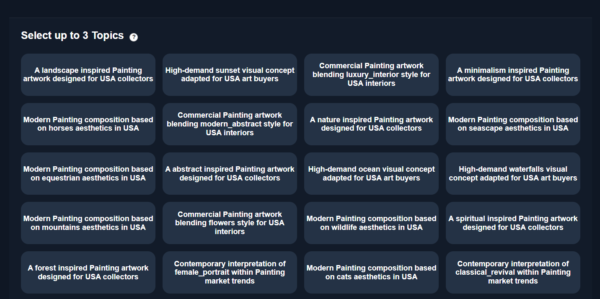
After selecting the target market, Art Genesis displays 28 creative topics.
Choose three topics that best describe the artistic direction you would like the AI to follow.
These topics act as creative guidance for the generation process and have a significant influence on the final artwork.
Different topic combinations can produce dramatically different artistic results.
Take your time selecting the three topics that best match your creative vision.
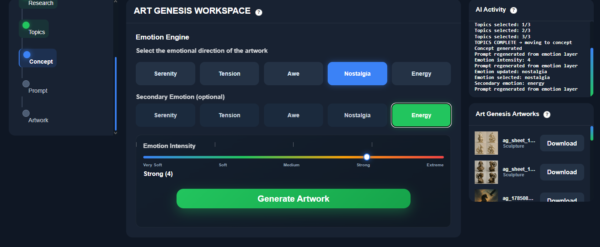
Step 4 – Select the Emotional Target
The next step is choosing the emotional experience you want your artwork to communicate.
Available emotional targets are:
- Serenity
- Tension
- Awe
- Nostalgia
- Energy
The selected emotion becomes one of the most important creative parameters used by the AI during artwork generation.
It influences the atmosphere, visual composition, artistic mood, and emotional storytelling of the final artwork.
Step 5 – Adjust Emotion Intensity
Once the emotional target has been selected, you can adjust the Emotion Intensity slider.
This control determines how strongly the chosen emotion should be expressed in the generated artwork.
A lower intensity creates a more subtle emotional atmosphere, while higher intensity produces stronger visual impact and more expressive artistic characteristics.
Experimenting with different intensity levels allows you to create artworks with very different emotional personalities.
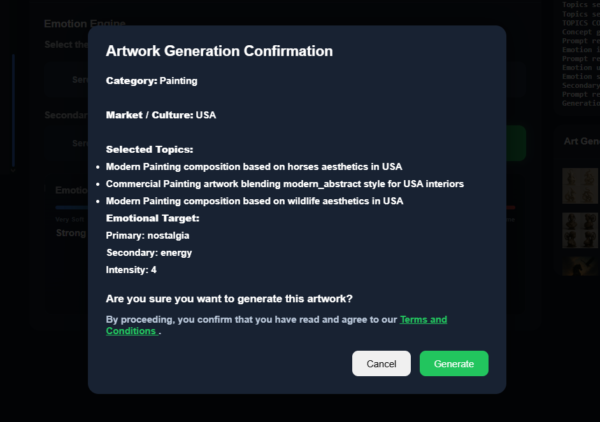
Step 6 – Review Your Selections
Before generation begins, Art Genesis displays a confirmation page summarizing all of your selected options.
Review your choices carefully, including:
- Category
- Target Market
- Selected Topics
- Emotional Target
- Emotion Intensity
If you wish to modify any selection, simply return to the previous steps.
When you are satisfied with your configuration, click the Generate button.
Step 7 – AI Generation
Once the Generate button has been pressed, Art Genesis begins creating your artwork.
The entire generation process usually takes less than one minute.
During this time, the AI analyzes all of your selected creative parameters and combines them with current market intelligence to produce a completely original artwork.
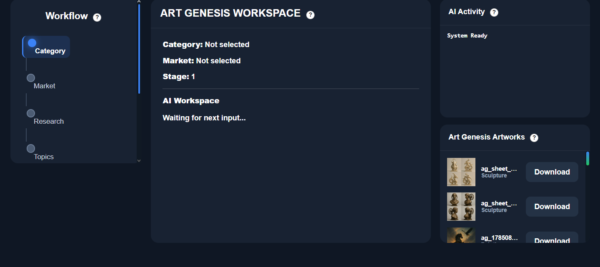
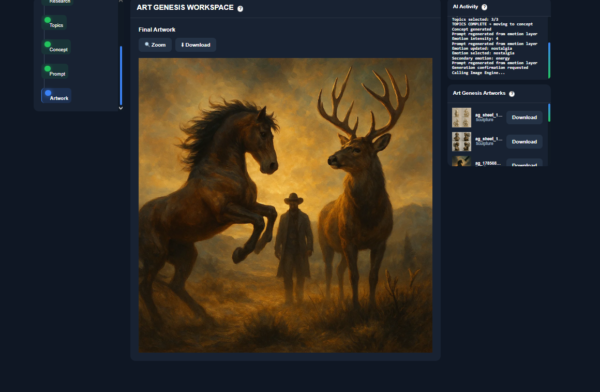
Step 8 – ART GENESIS Workspace
When the generation process is complete, your new artwork automatically appears inside the ART GENESIS WORKSPACE.
From there, you can:
- View your generated artwork.
- Review the final result.
- Download the image.
- Keep it stored in your personal workspace.
Ownership & Privacy
Every artwork generated by Art Genesis is created exclusively for the account that generated it.
Your generated artwork:
- Belongs exclusively to your LabriniHouse account.
- Is securely stored in your personal workspace.
- Is available for download at any time.
- Cannot be accessed by other users.
This ensures that every generated artwork remains private and available whenever you wish to revisit or download it.
Tips for Better Results
✔ Select the market that best matches your intended audience.
✔ Carefully choose your three topics, as they have a major influence on the final artwork.
✔ Experiment with different emotional targets to create unique artistic experiences.
✔ Use the Emotion Intensity slider to fine-tune the mood of your artwork.
✔ Generate multiple variations to explore different creative directions before deciding on your final concept.
Art Genesis has been designed to combine your imagination with the power of Artificial Intelligence and real market intelligence, helping you create original artworks that are both artistically inspiring and commercially relevant.